
Tháng Bảy 26, 2026
iPhone AI Tip: You Can Copy Text From Photos With This Trick
10
0
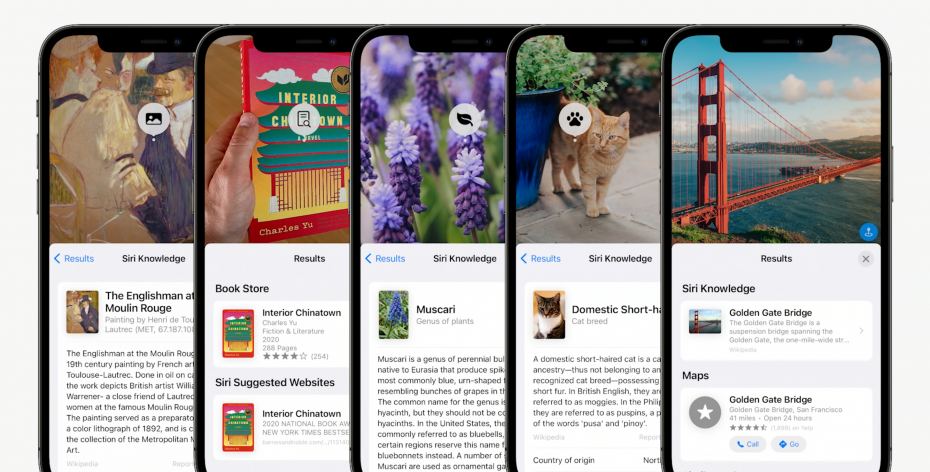
This feature dropped in 2021, but it's still useful today.
There's a better way to digitize handwritten notes, old family recipes or any other hard copy you may have lying around. Nope, I'm not talking about taking a photo, or scanning the note or recipe and then promptly attaching it to an email.
Say someone scribbled an address or a number on a piece of paper. Your instinct is probably to type it out into your iPhone's Contacts app. But thanks to iPhone's Live Text feature, which dropped back in 2021, you don't need to do that. Live Text is an AI-based tool that lets your iPhone copy and paste any text in a photo using its camera. It doesn't matter if said text is handwritten or typewritten, but you'll want it to be legible enough that the iPhone can accurately detect and read it. Here's how to use it.
View this post on InstagramA post shared by Tech Tips x Style x Life (@sareenadayaram)
Live Text: Here's how to copy and paste text from a photo
1. Make sure your iPhone is running iOS 15 or later.
2. Point the camera at a subject that has any text you want to copy. You'll know Live Text has kicked in once you see a yellow outline around the text.
3. Tap on the Live Text icon on the bottom right corner of the picture to interact with any text in the frame.
4. Select the text you want to copy by pressing down like you would in Notes or a text message.
5. Hit Copy.
6. Paste this text into another app like Gmail or Notes.
Much like Google Lens, Live Text can also search for text in images stored in the Photos app. For instance, if there's a phone number in an image, you can tap it to dial the number, or if there's a French word, you can translate it to English.
Copying and pasting text from an image isn't exactly a new feature for smartphones. Android users might already be familiar with this functionality thanks to Google Lens. However, Live Text is a little different from Google Lens in that you can use it in real time with your camera to select, copy and paste text, as the iPhone is trained to recognize useful information. As I said earlier, it makes for a helpful productivity tool for copying handwritten notes or text from images and then digitizing them.
Bài viết liên quan

Cách Tôi Sử Dụng Trí Tuệ Nhân Tạo làm Giáo Sư...

"ChatGPT giúp tóm tắt sách mà không sợ bị sao chép"...
Tháng Bảy 26, 2026

Thử Sử Dụng Trí Tuệ Nhân Tạo Làm Thiệp Cưới: Thành...
Tháng Bảy 26, 2026
Kết quả khảo sát AI của Pixel 9 Pro kỳ lạ....
Tháng Bảy 26, 2026
"Điện thoại iPhone của bạn có tương thích với iOS 18...
Tháng Bảy 26, 2026
Bình luận - đánh giá
Tin nổi bật

2023 tiếp tục là năm khó khăn của thị trường smartphone
Tháng Chín 04, 2024

Leitz Phone 1 đã được bán ra tại thị trường Nhật Bản
Tháng Chín 04, 2024

10 Awesome Things to Try on Your PS4 Right Now
Tháng Tám 30, 2024
Lượt xem nhiều nhất

CEO Apple Tim Cook đến Việt Nam
Tháng Chín 05, 2024
Leitz Phone 1 đã được bán ra tại thị trường Nhật Bản
Tháng Chín 04, 2024

11 of the Best Laptops Evaluated Based on Budget
Tháng Tám 30, 2024

Một số câu hỏi thường gặp về trí tuệ nhân tạo
Tháng Chín 04, 2024
Đăng ký
TVQuản trị viênQuản trị viên
Xin chào quý khách. Quý khách hãy để lại bình luận, chúng tôi sẽ phản hồi sớm